
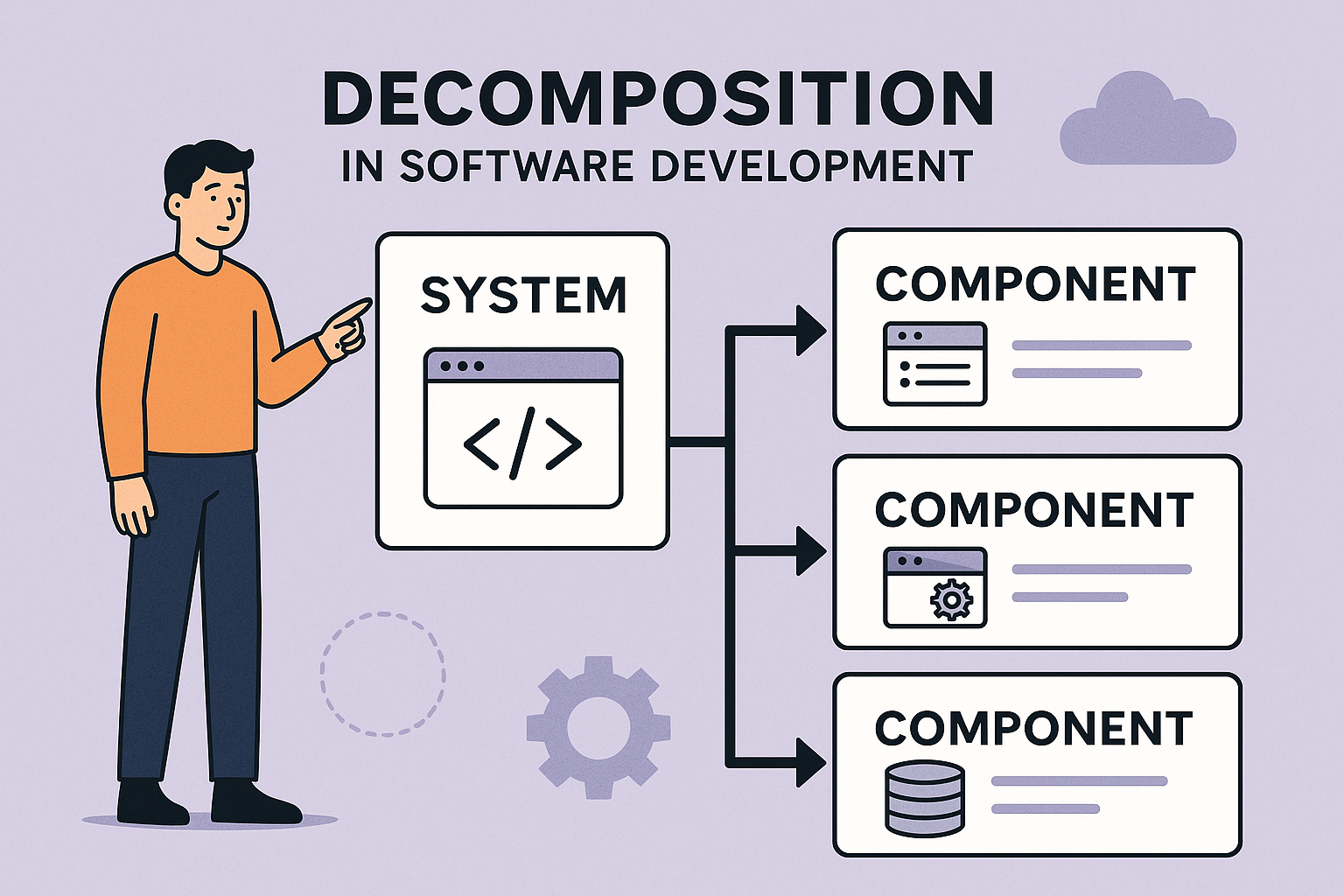
Decomposition
1.1.6 Know and understand the purpose of decomposition.
1.1.7 Know the tasks of decomposition: identify the main features of a problem, characterise each identified feature, break problems down into smaller, more manageable parts.
1.1.8 Be able to use decomposition for problem solving.
1.1.9 Know and understand the methods to represent decomposition: block diagrams, information flow diagrams, flowcharts, code, written descriptions.
1.1.10 Be able to use the methods to represent decomposition.
1.1.6 The Purpose of Decomposition
Decomposition is the process of taking a large, complex problem and dividing it into smaller, more manageable tasks. Each smaller part can then be solved independently or in sequence, making it easier to understand and implement a solution. Whether you're writing a computer program, planning a project, or tackling a big homework task, decomposition can make your job simpler and more structured.
1.1.7 Tasks Involved in Decomposition
The first step in this process is identifying the main features of the problem. This requires a clear understanding of what the problem is asking. You should carefully read or listen to the problem description, highlight the overall goal, and determine what inputs are required and what outputs are expected. It is also important to recognise any constraints or rules that must be followed. For example, in a ticket booking system, the main features might include user login, selecting events, choosing seats, and processing payments.
Once the main features have been identified, the next step is to characterise each feature in more detail. This involves understanding how each part functions by identifying its inputs, processes, and outputs. You should consider what data or actions are needed, what operations or logic are applied, and what result is produced. Asking questions such as “What does this part do?”, “What does it need to start?”, and “What does it produce?” can help clarify each feature. For instance, when choosing seats in a ticket booking system, the inputs include available seat data and the user’s selection. The process involves checking availability, and the output is a confirmed seat reservation.
The final step is to break the problem down into smaller sub-tasks or components. Effective decomposition ensures that each sub-task can be developed independently, follows a logical sequence, and can potentially be reused in other systems. There are several techniques that can support this process, including using flowcharts to visualise the sequence of tasks, pseudocode to outline the logic, and modular programming to implement each component as a separate function or module. In the ticket booking example, the problem could be divided into sub-tasks such as creating a login function, displaying available events, allowing users to select an event and view a seating map, reserving a seat, and processing payment to confirm the booking.
1.1.8 Using Decomposition
Decomposition is a key skill in Computer Science and computational thinking. It involves breaking a large, complex problem into smaller, more manageable parts. Instead of trying to solve everything at once, you divide the problem into sections that are easier to understand, design, and test. This makes problem solving more structured and less overwhelming.
For example, imagine you are building a simple online shop. Rather than tackling the entire system at once, you might break it down into smaller parts such as user login, product display, shopping basket, and payment processing. Each of these can then be solved separately before being combined into a complete solution.
Decomposition is useful because it reduces complexity, makes debugging easier, and allows multiple people to work on different parts of a problem at the same time. However, to use decomposition effectively, you need a clear way to represent and communicate your ideas. This is where different methods of representation come in.
1.1.9 Methods to Represent Decomposition
Block Diagrams
Block diagrams show a system as a set of connected blocks. Each block represents a smaller part of the overall problem, and arrows show how these parts are linked.
This method is useful at the early stages of problem solving because it provides a high-level overview without too much detail. You can quickly identify the main components of a system and how they interact. For example, in a game, you might have blocks for input, game logic, and output.
To use block diagrams effectively, start by identifying the major parts of your problem. Then draw each part as a block and connect them using arrows to show relationships or dependencies.
The example below shows how an order system can be broken down using decomposition, with the different parts of the system communicated using a block
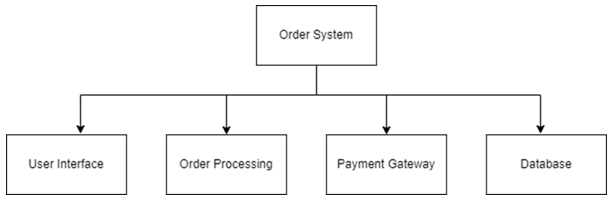
Figure 1 Example of a Block Diagram for an Ordering System
Information Flow Diagrams
Information flow diagrams (sometimes called data flow diagrams) focus on how data moves through a system. They show inputs, processes, and outputs, helping you understand what information is needed and where it goes.
This method is particularly useful when your problem involves handling data, such as user input or file processing. It helps you avoid missing important steps or data transformations.
To use this method, identify what data enters the system, what processes act on it, and what outputs are produced. Then connect these elements with arrows to show the flow of information.
The example below shows how data moves through the different processes involved in a typical booking system.
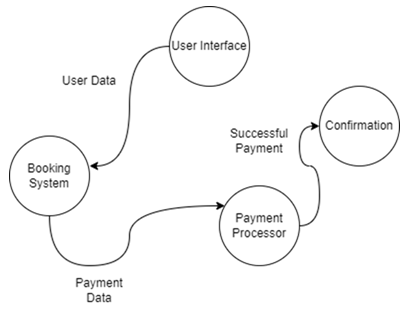
Figure 2 Example of an Information Flow Diagram for a Booking System
Flowcharts
Flowcharts represent the step-by-step logic of a process using standard symbols such as rectangles (processes), diamonds (decisions), and arrows (flow of control).
They are useful when you need to show exactly how a smaller part of a problem works. For example, a login system might include steps like entering a password, checking it, and deciding whether access is granted.
To use a flowchart, take one part of your decomposed problem and map out each step in order. Include decision points where the process might branch in different directions.
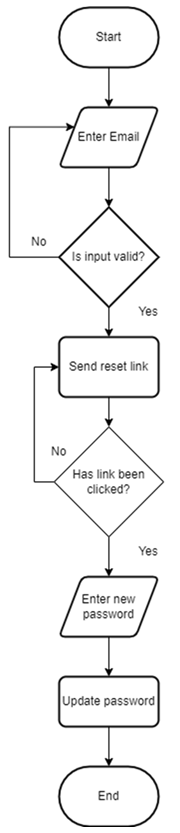
Figure 3 Example of a Flowchart for a Password Reset function
Code
Code is the most detailed way to represent decomposition. In programming, decomposition often appears as functions, procedures, or modules. Each function handles a specific task, making the program easier to read, test, and maintain.
For example, instead of writing one long program, you might create separate functions such as calculateTotal(), validateUser(), and processPayment().
To use code as a representation of decomposition, identify repeated or distinct tasks and turn them into separate functions. This allows you to reuse code and isolate errors more easily.
Written Descriptions
Written descriptions explain each part of the problem in plain language. This might include step-by-step instructions, bullet points, or structured paragraphs.
This method is especially useful when planning or communicating ideas to others who may not understand diagrams or code. It helps clarify your thinking before you move on to more technical representations.
To use written descriptions, describe each sub-problem clearly. Explain what it does, what inputs it needs, and what outputs it produces. This can act as a bridge between your initial ideas and your final solution.
Decomposition Explainer Video by NotebookLM